
01
Tells you
Email and SMS when a detection arrives in or near a project. One message per batch, a cooldown on running events, de-duplication so the same fire never alerts twice — and a stand-down message when it is over.
Overwatch · Live monitoring
Overwatch watches your land around the clock, tells the right people when something is detected nearby, and has the first round of analysis done — simulated, assessed and written up — before anyone is awake.
Detections in
Assessed by
Weather and fire danger
Your assets
Local fire history
Every step logged
Modelled with
Hectares and assets reached
Confidence range
Spread animation
Sent to you
An operational brief
— or a reasoned decision
not to disturb you
Detections are assessed against the landscape you have already built in Mitigate — fuel loads, treatments, assets and fire history.
Why it matters
Detection data already exists. What is missing is someone watching it at 2am, filtering out the noise, and turning a pixel into a decision before the fire has made it for you.
Without Overwatch
With Overwatch
Fires start when nobody is looking — overnight, on a weekend, on the far side of an estate no one has driven this week.
Every project is watched around the clock, and satellites re-scan every ten minutes. You hear about it while there is still time to act.
Raw hotspot feeds are noisy. Burn-offs, industrial heat and the same fire re-detected on every pass soon teach people to ignore their phone.
Detections are grouped into events, judged against your instructions and de-duplicated. When your phone goes off, it is worth reading.
A hotspot is a dot on a map. The first hour goes on pulling the forecast, finding the fuel layers and working out what it could reach.
The alert arrives with that work done: weather, fire danger, an ensemble spread simulation and the assets in its path.
Watching a large estate properly means someone on screens, or a roster of people checking feeds after hours.
Cover a whole portfolio without adding a shift. People are brought in when judgement is needed, not to sort noise.
After an event it is hard to show what was known, when, and why someone did — or did not — act.
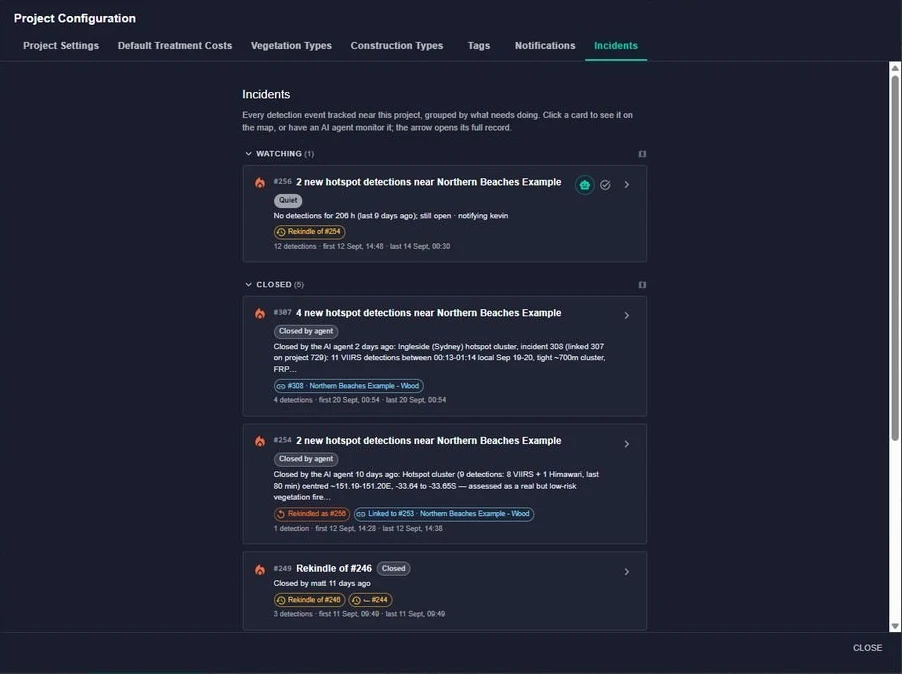
Every assessment is logged with its reasoning, including the decision not to alert. A record for your team, a regulator or an insurer.
Built for
What it watches
Each detection type has its own map layer, a 1h / 6h / 24h / 72h time window and a live count. Click any detection to inspect it, or turn it straight into an ignition.
What it does
01
Email and SMS when a detection arrives in or near a project. One message per batch, a cooldown on running events, de-duplication so the same fire never alerts twice — and a stand-down message when it is over.
02
Any detection becomes a fire spread simulation. An ensemble of runs under the current forecast gives the likely area burnt and the assets reached, with a range around both.
03
An AI agent assesses each detection against weather, fire danger, your assets and local fire history, decides whether it warrants a simulation, publishes an operational brief and sends you the link — recording every step it took.
The alert
The SMS is the short version for 2am: what was seen, where, and the headline simulation figures. The email carries the full picture — distance to your boundary, how long it has been burning, new detections since, and a link to the brief with the spread animation and exposed assets.
You will hear again if a separate event appears, the area flares up after going quiet, or the fire grows into your alert radius. Otherwise, you won't.
12:32
FiSci Mitigate
Every decision, written down
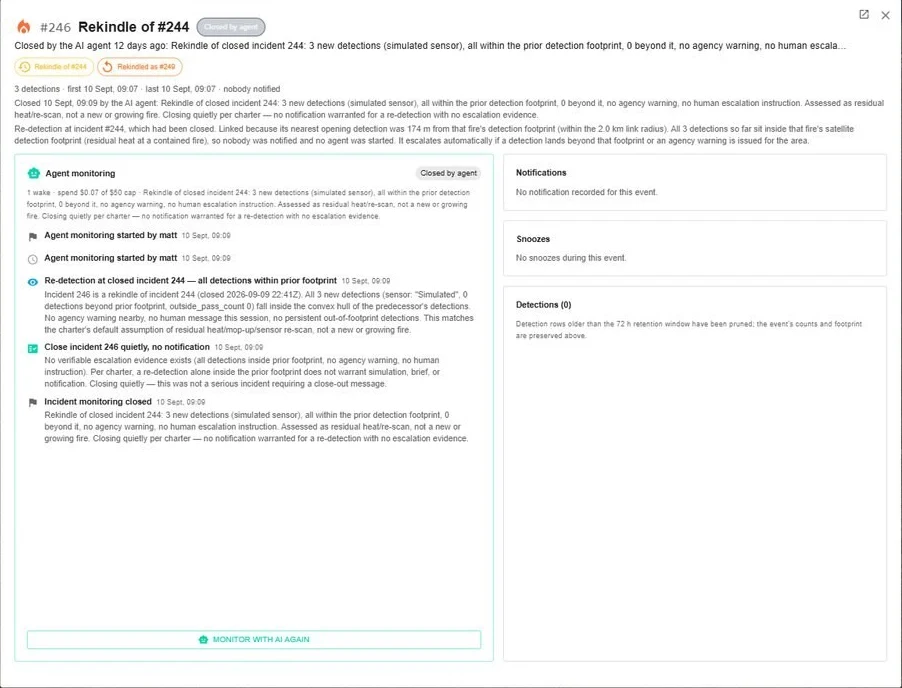
Most detections are routine — a small, low-intensity cluster in country with plenty of burn history, under benign weather. Overwatch is built to stay quiet about those, and to write that decision up as fully as a decision to alert.
Below is a real activity log. The agent woke on a hotspot, pulled the forecast and the day's fire danger, checked the project and its assets, calculated the fire danger index — then closed it without waking anyone.
You set the rules
AI incident monitoring is switched on per project, so you can run it on the ground that matters most. Instructions can raise or lower the threshold for waking people — but never stop the agent reporting a life-safety threat it can evidence.
Tell the agent, in your own words, what matters most and what local practice explains a detection. Set once for the organisation, refined per project.
“Do not notify anyone for a single detection more than 25 km from an asset unless the forecast fire danger is severe or above.”
Choose how far beyond your boundary a detection can be and still raise an alert. The fire just outside the fence is usually the one that matters.
Have a fire simulated the moment a given kind of detection opens an incident, and optionally published straight into your own GIS as time-enabled layers.
Per person, per project, per detection type, per channel. Administrators can cover a whole district team without waiting for anyone to log in.
Run your own
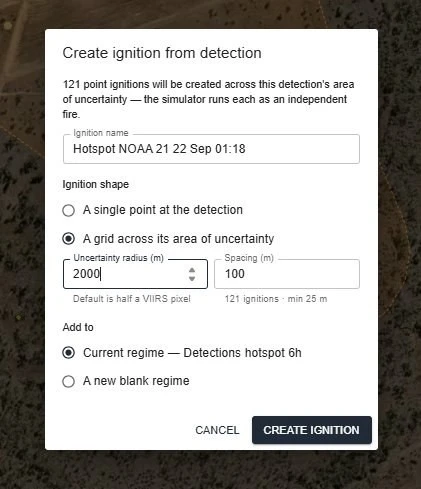
Want your own spread prediction, or a different weather assumption? Click any detection and create an ignition from it. For satellite hotspots, fill the pixel's area of uncertainty with a grid of ignitions and run each as its own fire — so the result reflects everywhere the fire could really have started.
What sets it apart
5 m
Five-metre detail even on the largest estates, so a simulated run follows the roads and trails that are really there.
P10–P90
Ensembles vary weather, fuel and ignition together. You get a range around the answer, not a single fire line.
24/7
Satellite re-scans every ten minutes, assessed as they land — including at 2am, when nobody is looking.
Logged
Why it alerted, and why it did not. Reviewable by your team, a regulator or an insurer.
Overwatch is available as an add-on to a Mitigate licence; detection type availability varies by organisation. Everything Overwatch produces is AI-generated and advisory. It supports your judgement and does not replace official warnings or instructions from emergency services.
We'll build a project over your own landscape — your assets, your fuel loads, your fire history — and show you what Overwatch would have told you.